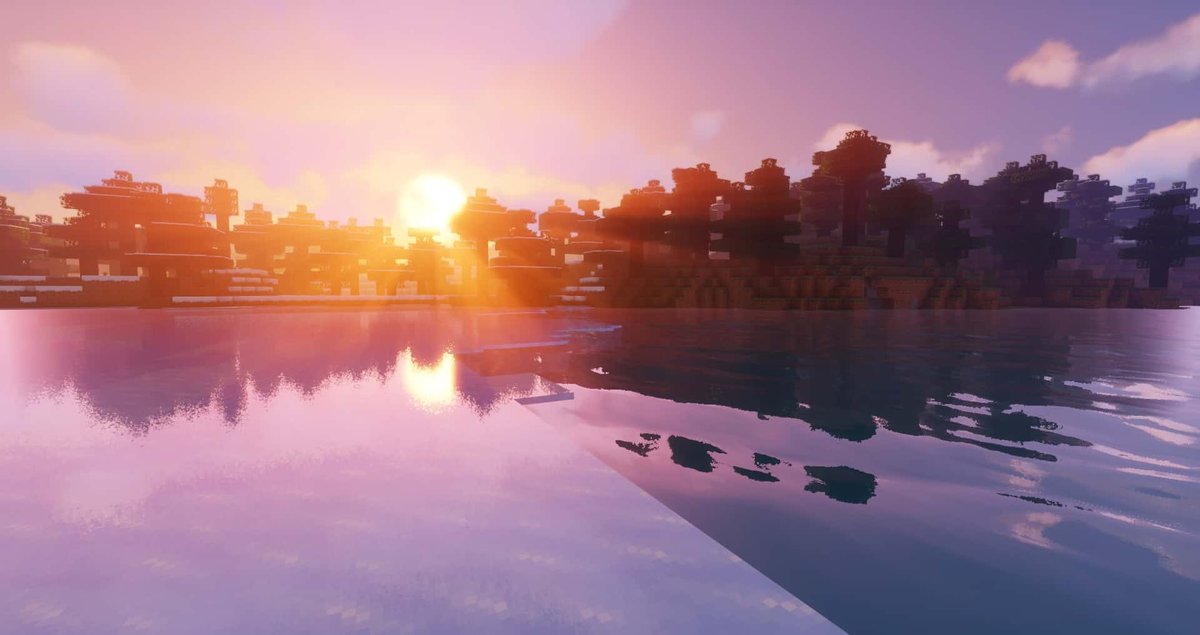
The blocky realms of Minecraft have always been a canvas for imagination, but few themes inspire the same raw, epic grandeur as the Vikings. For those of us drawn to the sagas, the longships, and the formidable warriors of the Norse legends, the vanilla Minecraft experience often feels a little, well, too vanilla. That’s where Minecraft Viking Texture Packs & Shaders come in, utterly transforming your world from a pixelated playground into a realm fit for Odin himself.
Forget the generic cobblestone and plain iron tools. Imagine crafting with runes inscribed on your workbench, wielding a historically inspired axe as you confront a Draugr-like zombie, or gazing upon a sky lit by an ethereal aurora borealis. These packs and shaders aren't just aesthetic tweaks; they're gateways to a fully immersive Norse adventure, turning every block, item, and environmental detail into a piece of a sprawling Viking epic.
At a Glance: Forging Your Norse Realm
- What They Are: Texture packs (also called resource packs) overhaul the look of blocks, items, mobs, and UI elements. Shaders enhance lighting, shadows, water, and environmental effects.
- Why You Need Them: Experience unparalleled immersion, bring Norse mythology to life, and enjoy a fresh, visually stunning Minecraft adventure.
- Key Content: Expect themed armors, runic enchantment tables, authentic weaponry (axes, tridents, custom shields), Draugr mob skins, Viking fonts, and even frothy mugs.
- Resolution Options: Most commonly 16x (vanilla-friendly), but also 32x, 64x, and even ultra-realistic 1024x packs exist.
- Essential Mods: Many contemporary packs, especially those with Custom Item Textures (CIT), require Optifine or Fabric for full functionality. Some specific items, like certain shields, can work without additional mods.
- Where to Find Them: PlanetMinecraft.com is a treasure trove, offering packs for various Minecraft versions (1.6.2 up to 1.21.1) and Bedrock Edition.
- Top Creators: Look for works by VelociGamerBR, Kalam0n, rikitikitivi, Faxu, and AgabeGames, who are highly regarded in the community.
- Getting Started: Match your pack to your Minecraft version (Java or Bedrock), download, install in your resourcepacks folder, and activate.
What Are We Talking About, Exactly? Reskinning Your Saga
Before we plunge into the fjords, let’s clarify our terms. When we talk about Minecraft texture packs and shaders, we're discussing two distinct but complementary tools for visual transformation.
Texture Packs (Resource Packs): The Visual Overhaul
At their core, texture packs are collections of files that change the look of nearly everything in Minecraft. This includes:
- Blocks: Stone becomes aged, wood takes on a rougher, hand-hewn appearance, and crafting tables might feature intricate carvings.
- Items: Swords become axes and daggers, bows might look like longbows, and even food items can take on a medieval, hearty aesthetic.
- Mobs: Zombies transform into fearsome Draugr, skeletons become archers in scale mail, and even animals can get a more rugged, northern look.
- User Interface (UI): Menus, health bars, and inventory screens can be styled with Viking motifs, runic fonts, and themed backgrounds.
For Viking enthusiasts, this means every single pixel can contribute to the Norse theme. From the grain of your wooden shield to the menacing glow in a mob's eyes, a good texture pack ensures your world screams "Skol!" at every turn.
Shaders: The Atmospheric Alchemy
Shaders are a different beast entirely. They don't change the textures of blocks or items, but rather how light interacts with them, and how the environment looks as a whole. Think of them as a cinematic filter applied to your entire game. With shaders, you can experience: - Dynamic Lighting and Shadows: Realistic sunbeams piercing through trees, flickering torchlight, and deep, atmospheric shadows that bring a sense of mystery and depth.
- Realistic Water: Flowing rivers, reflective lakes, and stormy oceans that ripple and shimmer as if they were real.
- Volumetric Clouds and Fog: Creating misty mornings, dense fogs rolling through valleys, and breathtaking cloud formations.
- Environmental Effects: Swaying foliage, shimmering heatwaves, and, most importantly for our Viking theme, stunning aurora borealis effects that paint the night sky with otherworldly colors, making your world feel truly Nordic.
While texture packs give you the assets of a Viking world, shaders provide the atmosphere. They work in tandem to create an incredibly immersive experience.
Why Dive into a Viking Minecraft World? The Call of the North
Beyond mere aesthetics, immersing yourself in a Viking-themed Minecraft world offers a richer, more engaging gameplay experience:
- Deep Immersion & Roleplay: When every visual cue reinforces the Norse theme, you're not just playing a game; you're living a saga. Whether you're building a longhouse, exploring a frost-covered landscape, or battling hostile mobs, the Viking aesthetic deepens your connection to the world and fuels your roleplaying adventures.
- Historical & Mythological Connection: For fans of Norse history and mythology, these packs are a fantastic way to engage with the lore. Seeing Futhark runes on your enchantment table or encountering a mob that clearly evokes a Draugr makes the legends feel tangible.
- Enhanced Building & Exploration: A change in textures can inspire entirely new building styles. Suddenly, that generic stone block is perfect for a ancient stone wall, or rough-hewn planks become ideal for a ship's hull. Exploration feels more adventurous when every biome looks like a potential site for a new discovery or a hidden treasure.
- A Fresh Perspective: If you've spent hundreds of hours in vanilla Minecraft, a comprehensive texture pack and shader combo can make the game feel brand new. It reignites the sense of wonder and makes you want to explore every corner of your redefined world.
Crafting Your Norse Realm: Texture Packs Explained
The heart of any Viking transformation lies in its texture packs. These are the tools that rebuild your world block by block, item by item, in the spirit of the Norsemen.
The Building Blocks of Valhalla: General Elements and Resolution
Most Viking texture packs on sites like PlanetMinecraft.com aim for a cohesive, era-appropriate aesthetic. They often feature:
- Rougher, Natural Textures: Expect wood to look more unrefined, stone to have a weathered appearance, and metals to show signs of ancient craftsmanship.
- Earthen Tones: Colors often lean towards browns, greys, deep greens, and muted blues, reflecting the landscapes of Northern Europe.
- Symbolic Detail: Many packs incorporate subtle (or not-so-subtle) Norse patterns, knotwork, and symbols into block and item designs.
Understanding Resolution:
Texture pack resolution is crucial, as it dictates the level of detail. It’s expressed as a multiplier of Minecraft’s default 16x16 pixel textures: - 16x (Default): Many popular Viking packs, including LordTrilobite's NorseCraft 2.1.3 and riki's Armor Collection 1.18+, maintain this resolution. This ensures smooth performance, even on older machines, while still offering a dramatically different visual style. The 16x resolution often gives a classic, pixel-art feel that perfectly suits Minecraft's blocky nature.
- 32x, 64x, 128x: These resolutions offer more detail and smoother transitions between pixels, resulting in a more refined look. They require more powerful hardware but can drastically enhance the realism and visual fidelity.
- 1024x (Realistic): While rare, some ultra-high-resolution packs exist, pushing Minecraft's visual boundaries into photorealism. These are demanding on hardware but can create breathtaking results for those with powerful rigs.
A Pantheon of Pixelated Power: Key Content Elements
A truly great Viking texture pack goes beyond just blocks. It reimagines the entire game world through a Norse lens:
- Armors Reimagined: Generic armor sets are transformed into Viking chainmail, scale armor, or leather tunics adorned with fur and metal plates. riki's Armor Collection 1.18+ is a prime example, offering detailed changes to how your character looks.
- Weapons of the Aesir: Swords become axes (be they Dane axes, bearded axes, or hand axes), tridents are reshaped into formidable spears or even Mjolnir-like hammers, and bows might resemble ancient longbows. VelociGamerBR's "Mo' Weapons" is a fan favorite for its extensive arsenal.
- Shields of the Einherjar: Round shields are a staple, often featuring intricate patterns, animal motifs, or even specific designs like the "Assassin's Creed Valhalla shield." The "Round Shield (Dont Require Optifine!!!) 1.21.1" pack is particularly popular for offering this iconic item without extra mod dependencies. VelociGamerBR's "Mo' Shields" also offers a vast array of bucklers and other defensive gear.
- Runic Magic: Enchantment tables often feature Futhark runes, replacing the default gibberish with ancient Norse script, adding an air of mystique and power to your enchanting endeavors.
- Draugr and Jötnar: Hostile mobs are re-skinned to fit the theme. Zombies become grotesque Draugr – undead Norse warriors – while other creatures might take on the appearance of mythical beasts or Frost Giants. Kalam0n's "Kal's Grimdark Viking Pack" excels at creating a truly unsettling and atmospheric mob experience.
- Themed Items and UI: Small details make a big difference. Think frothy Viking mugs for drinks, themed beds resembling rough furs, or pixel fonts that mimic ancient script. VelociGamerBR's "Viking Pack" (available in CIT and Vanilla versions) integrates many such thematic items.
- Grimdark Aesthetics: Some packs lean into the darker, grittier aspects of the Viking age, offering a more somber and realistic take on the visual style, perfect for those seeking a more challenging or survival-focused roleplay experience.
The Master Forgers: Top Creators and Their Legacies
The vibrant community behind Minecraft resource packs is full of talented artists. When seeking quality Viking content, certain names frequently rise to the top:
- VelociGamerBR: A prolific creator known for their extensive collections, particularly "Mo' Weapons," "Mo' Shields," and their dedicated "Viking Pack." Their "Skyrim Dragonborn Pack" also provides a fantastic blend of fantasy and Norse inspiration, perfect for those who enjoy building detailed Viking Minecraft schematics. Their packs often leverage Custom Item Textures (CIT) for unparalleled detail.
- Kalam0n: The mastermind behind the "Kal's Grimdark Viking Pack," offering a grittier, more atmospheric take on the Norse theme for both Java and Bedrock editions.
- rikitikitivi: Famous for "riki's Armor Collection 1.18+," providing detailed and historically inspired armor sets.
- LordTrilobite: Creator of the highly downloaded "NorseCraft 2.1.3," a classic 16x pack that helped define the Viking aesthetic for many early players.
- Faxu and AgabeGames: Other notable contributors who have enriched the Viking landscape with their unique creations.
These creators often dedicate countless hours to research and pixel artistry, ensuring their packs are as authentic and immersive as possible.
Tales from the Jukebox: Most Downloaded Packs
Curiosity about what the community truly loves? Here are some of the most downloaded Viking-themed texture packs on PlanetMinecraft, giving you a great starting point for your own adventures:
- LordTrilobite's NorseCraft 2.1.3 (16x, 1.6.2): A foundational pack with over 315.8k downloads and a 95% rating. It’s a testament to its enduring appeal and classic Viking style, perfect for older Minecraft versions.
- riki's Armor Collection 1.18+ (16x, 1.18+): With 147.2k downloads, this pack focuses specifically on transforming your armor sets into impressive Norse-inspired gear, proving that focused thematic changes can be incredibly impactful.
- Roleplay Resourcepack - Medieval Delight (16x, 1.19.2): Boasting 91.3k downloads and a 95% rating, this pack, while broader "medieval," provides an excellent foundation for Viking roleplay, offering a rustic and authentic feel that pairs perfectly with Norse themes.
- Round Shield (Dont Require Optifine!!!) 1.21.1 (16x, 1.21.1): An impressive 69.2k downloads for a pack that does one thing exceptionally well: providing iconic round shields without the need for additional mods. This highlights the demand for accessible, high-quality cosmetic changes.
- VelociGamerBR's Collections (1.21.1): This creator's work is consistently popular:
- "Mo' Weapons" (63.1k downloads) for an expanded armory.
- "Mo' Shields" (44k downloads) offering a variety of defensive options.
- "Viking Pack" (CIT: 36.6k, Vanilla: 39.7k downloads) which offers a comprehensive thematic overhaul.
- "Centurion Pack" (39.5k downloads), while Roman-themed, showcases the creator's versatility and quality, often used in broader historical roleplay.
- "Skyrim Dragonborn Pack" (CIT: 36.7k, Vanilla: 33.5k downloads) blending popular fantasy with a strong Norse aesthetic.
- Kal's Grimdark Viking Pack (Java: 50.8k downloads for 1.19-1.21.1; Bedrock: 18.2k downloads): This pack's success across both Java and Bedrock editions speaks to the appeal of its darker, more realistic Viking aesthetic.
- Assassin Creed Weapons and Items Pack (16x, 1.18.1): With 50.7k downloads and an 80% rating, this pack caters to fans of the Assassin's Creed Valhalla game, offering specific items and weapons that tie directly into that popular Viking narrative.
These packs represent the cream of the crop, providing both quality and popularity as indicators of their ability to deliver an authentic Norse experience.
Beyond the Basics: CIT, Optifine, and Fabric
Many of the most detailed and immersive Viking texture packs leverage advanced features that go beyond simple texture swaps. Understanding these can help you get the most out of your chosen pack:
- Custom Item Textures (CIT): This feature, primarily enabled by Optifine or Fabric, allows resource pack creators to assign unique textures to specific items based on their NBT data (like custom names, lore, or durability). This means a single "wooden sword" could look like a different custom axe depending on how it's named in an anvil, dramatically expanding customization possibilities without adding new items to the game. VelociGamerBR's packs, for example, heavily utilize CIT to offer a vast array of unique weapons and shields.
- Optifine: This widely popular mod is almost essential for modern resource pack and shader usage. Beyond boosting performance and providing graphical enhancements, Optifine is often required for features like CIT, custom skies, and proper shader integration. Installing Optifine (or an alternative like Fabric with Iris Shaders) is usually the first step for a truly transformed Minecraft experience.
- Fabric: An alternative mod loader to Forge, Fabric is gaining popularity for its lightweight nature and speed. If a pack or shader specifies Fabric compatibility, you'll need the Fabric loader along with specific API mods (like Fabric API and Iris Shaders for shader support) to run them.
While some simpler packs, like the "Round Shield (Dont Require Optifine!!!) 1.21.1" mentioned earlier, offer fantastic content without these dependencies, for the full, rich Viking experience, getting comfortable with Optifine or Fabric is highly recommended.
Illuminating the Sagas: The Role of Shaders
While texture packs provide the substance of your Norse world, shaders imbue it with atmosphere, bringing the landscapes and sagas to life with breathtaking light and shadow.
From Misty Fjords to Ethereal Aurora: How Shaders Transform the Experience
Imagine building a longhouse on a snowy peak, and as dusk settles, the sky above you begins to dance with vibrant greens, purples, and blues – the aurora borealis. That's the power of shaders. They elevate the visual fidelity by:
- Realistic Lighting: The sun no longer just makes things bright; it casts long, volumetric rays through the trees, creating dappled light and deep, convincing shadows. Torches cast dynamic, flickering light that truly illuminates dark caves and halls.
- Enhanced Water: Water gains reflections, refractions, and realistic waves, transforming stagnant ponds into shimmering lakes and blocky oceans into rolling, immersive seas.
- Atmospheric Effects: Shaders introduce fog, volumetric clouds, and weather effects that can make a simple walk through a forest feel like a journey through an ancient, mystical land. For Viking themes, this means misty mornings, stormy skies, and the iconic aurora, which some shaders render with stunning accuracy.
- Color Grading: Many shaders also adjust the overall color palette of the game, creating a more cohesive and cinematic feel that can enhance the grimdark or majestic aspects of your Viking theme.
Choosing Your Light: General Shader Considerations
Selecting a shader pack is a personal choice, heavily dependent on your system's capabilities and your desired aesthetic.
- Performance vs. Visuals: More realistic shaders are very resource-intensive. Start with lighter shaders (like Sildur's Enhanced Default or Complementary Shaders) and only upgrade if your framerate remains stable.
- Compatibility: Ensure your chosen shader pack is compatible with your Minecraft version and, crucially, with Optifine or Fabric (via Iris Shaders).
- Desired Mood: Do you want bright, vibrant scenes, or a darker, moodier atmosphere? Some shaders are built for realism, others for fantasy. Experiment to find the one that best complements your Viking texture pack.
Popular shaders like BSL, SEUS (Sonic Ether's Unbelievable Shaders), and Complementary Shaders are excellent starting points, offering a range of customization options to fine-tune your visual experience.
Your Journey to Jotunheim: Choosing and Installing Your Packs
Getting these magnificent transformations into your game might seem daunting at first, but it's a straightforward process.
Matching Your Minecraft Version: Java vs. Bedrock
This is the most critical first step. Minecraft has two main editions:
- Java Edition: The original PC version, highly moddable, and compatible with Optifine/Fabric, which most advanced texture packs and all shaders require. Most downloadable Viking packs are for Java.
- Bedrock Edition: Available on Windows 10/11, consoles (Xbox, PlayStation, Switch), and mobile devices. Bedrock has its own marketplace for "addons" (resource packs) and offers limited shader support. Packs created for Java Edition will not work on Bedrock and vice-versa. Always check the pack's description for compatibility. Kalam0n's "Kal's Grimdark Viking Pack" is notable for having versions for both Java and Bedrock.
Always verify the pack's specified Minecraft version (e.g., 1.21.1, 1.19.2, 1.18+, etc.). Using an incompatible pack can lead to visual glitches or crashes.
Finding Your Fjord: Where to Download
- PlanetMinecraft.com: As our ground truth suggests, this is the premier hub for community-created Minecraft content. It offers an incredible array of Viking-themed texture packs and even links to recommended shaders. You can filter by version, resolution, and popularity.
- CurseForge: Another popular platform for Minecraft mods and resource packs.
- Official Creator Websites/Patreon: Some creators host their packs on their own sites or offer them through Patreon, often with early access to new features.
Always download from reputable sources to avoid malicious files.
Installing Your Loot: A Step-by-Step Guide (Java Edition)
- Install Optifine (or Fabric with Iris Shaders):
- Download the correct Optifine
.jarfile for your Minecraft version from the official Optifine website. - Run the
.jarfile and click "Install." This creates a new Minecraft profile. - For Fabric: Install the Fabric loader, then download Fabric API and Iris Shaders (for shaders) as
.jarfiles and place them in your.minecraft/modsfolder.
- Download Your Texture Pack(s) and Shader Pack(s):
- Download the
.zipfile for your chosen texture pack(s) and shader pack(s). Do NOT unzip them.
- Locate Your
resourcepacksandshaderpacksFolders:
- Open Minecraft Launcher, select your Optifine (or Fabric) profile, and launch the game.
- From the main menu, go to
Options->Resource Packs->Open Pack Folder. This will open your.minecraft/resourcepacksdirectory. - Similarly, for shaders, go to
Options->Video Settings->Shaders->Shaders Folder. This will open your.minecraft/shaderpacksdirectory.
- Move the Downloaded Files:
- Drag and drop the downloaded texture pack
.zipfiles into theresourcepacksfolder. - Drag and drop the downloaded shader pack
.zipfiles into theshaderpacksfolder.
- Activate in Minecraft:
- Go back to the Minecraft
Resource Packsmenu. Your downloaded packs should appear on the left side ("Available Resource Packs"). - Hover over your desired pack and click the arrow to move it to the right side ("Selected Resource Packs"). You can layer multiple texture packs, but be aware of potential conflicts.
- Click
Done. The game will reload the textures. - For shaders, go to
Options->Video Settings->Shaders, and click on your chosen shader pack to activate it.
- Enjoy Your New World!
Troubleshooting Your Expedition: Common Issues
- Performance Drops: High-resolution texture packs and demanding shaders can heavily impact FPS. Try a lower-resolution pack, a lighter shader, or adjust shader settings (shadow quality, render distance).
- Missing Textures/Glitches: Ensure the pack is compatible with your Minecraft version and that Optifine/Fabric is correctly installed if required. Try reloading the pack or Minecraft.
- "Invisible" Packs: Double-check that you placed the
.zipfile directly into theresourcepacksfolder and didn't accidentally unzip it or put it in a subfolder. - Shader Issues: Make sure you have Optifine/Iris installed. Check shader settings; some require specific graphics card drivers.
Common Sagas and Solutions: FAQs
Q: Can I use multiple Viking texture packs at once?
A: Yes, you can. Minecraft allows you to layer resource packs. The pack at the top of the "Selected Resource Packs" list (right side) will have priority for any overlapping textures. This means if two packs change the same block, the one higher on the list will be applied. This is great for mixing and matching specific elements, like using one pack for armor and another for blocks.
Q: Do Viking texture packs work on Minecraft Bedrock Edition?
A: Only if they are specifically created for Bedrock Edition. Java and Bedrock packs are not cross-compatible. Look for packs explicitly labeled for "Bedrock," "MCPE," or "Windows 10 Edition" on platforms like PlanetMinecraft or the Minecraft Marketplace.
Q: Will these packs impact my game's performance?
A: Yes, they can. Higher-resolution texture packs (32x, 64x, 1024x) require more memory and processing power. Shaders, especially realistic ones, are even more demanding. If you experience lag, consider lower-resolution texture packs, lighter shaders, or adjusting your in-game video settings (e.g., lower render distance).
Q: What's the difference between a "Viking Pack" and a "Medieval Pack" that looks Viking-ish?
A: A dedicated "Viking Pack" will focus specifically on Norse iconography, weaponry, architecture, and mob reskins. A "Medieval Pack" might offer a broader historical aesthetic that can blend with a Viking theme but might include elements (like knight armor or castles) that aren't strictly Norse. Many "Medieval Roleplay" packs can still work wonderfully with a Viking theme if they lean towards rugged, early medieval designs.
Q: Do I need Optifine for ALL Viking texture packs?
A: No, not all. Basic 16x texture packs that only swap existing textures generally don't require Optifine. However, packs that utilize Custom Item Textures (CIT), custom skies, connected textures, or rely on other advanced features will almost certainly need Optifine (or Fabric with equivalent mods) to function correctly and display all their intended content. Shaders always require Optifine or a Fabric-based shader mod.
Embrace the Northern Winds: Your Next Steps
You now possess the knowledge to transform your Minecraft world into a breathtaking Viking saga. The journey is yours to command. Head over to PlanetMinecraft.com, browse the immense collection of Minecraft Viking Texture Packs & Shaders, and begin your search for the perfect combination that speaks to your inner Jarl.
Experiment with different resolutions, mix and match packs, and don't be afraid to tweak shader settings until you find the perfect balance of visual grandeur and smooth performance. Whether you dream of sailing the seas in a meticulously crafted longship, raiding distant shores, or simply building a peaceful settlement nestled in a Nordic landscape, these powerful tools will bring your vision to life.
May your adventures be epic, your builds legendary, and your pixelated sagas forever echo in the halls of Valhalla.